

IT Support Provider in Houston Shares a Guide to Security Misconfiguration
Small and mid-sized businesses often assume their IT systems are secure, but overlooked settings can create hidden risks. A security misconfiguration occurs when system or application configurations are incorrect or incomplete, leaving exploitable gaps for attackers.
Nearly 23% of cloud security issues are caused by misconfigurations. These gaps can expose sensitive data, disrupt operations, and result in financial loss.
| Kent Morris, President of Gravity Systems, says, “Businesses that ignore proper system configuration risk exposing critical data to attackers who exploit the smallest errors.” |
Even a minor misconfiguration can lead to unauthorized access, stolen customer information, and reputational damage.
The danger lies in how these weaknesses manifest. For example:
- They can leave systems open to unauthorized access, giving attackers a direct entry point
- They allow security misconfiguration attacks to exploit overlooked settings and weak controls
- They create security misconfiguration vulnerability that increases the chance of data loss and downtime
Recognizing these risks, and understanding how attackers exploit them, is essential to safeguarding your organization. This blog from a leading Houston IT support provider will guide you through security misconfiguration examples, causes, vulnerabilities, and prevention strategies, helping you protect your systems effectively.
Common Security Misconfiguration Examples
Security misconfiguration examples appear across applications, networks, and cloud systems. They are not always obvious, but they create openings for attackers to access sensitive data or manipulate systems. The following examples highlight common security misconfigurations that can put your systems and data at risk:
- Default credentials: Using vendor-provided usernames and passwords is one of the most simple yet most dangerous misconfigurations. Attackers often try these first because they are widely known or easily guessed. Leaving them unchanged allows unauthorized access to critical systems. Combine this with enabled “WAN” side management, and you have a recipe for disaster.
- Unpatched systems: Almost 60% of cyber attacks exploit systems left exposed by unpatched vulnerabilities. Failing to update operating systems or applications exposes known flaws. Each patch fixes weaknesses, and missing updates increases your security misconfiguration vulnerability.
- Open cloud storage: Publicly accessible storage like AWS S3 buckets can leak sensitive files. Incorrect cloud configurations allow anyone online to access data without credentials.
- Inadequate access controls: Granting users more permissions than needed increases risk. Employees or partners with unnecessary access can accidentally or intentionally expose critical data.
Recognizing these security misconfiguration examples is the first step in reducing risk. Each case demonstrates how simple errors can escalate into serious security misconfiguration attacks, leading directly into the discussion on types of misconfigurations.
Types of Security Misconfigurations
CloudSecureTech found that misconfigurations drive 70% of security exposures. Understanding the categories of misconfigurations helps you identify and correct weaknesses in your IT systems. Here are some common security misconfiguration examples that frequently leave systems exposed to attackers:
- Unpatched Systems: Outdated software is a major contributor to security misconfiguration vulnerability. Attackers exploit publicly documented flaws to gain unauthorized access.
- Default Account Settings: Default usernames and passwords often remain after deployment. These can be guessed quickly by attackers. Changing them immediately reduces risk.
- Improper Access Controls: Excessive permissions and lack of segregation of duties allow attackers to move through systems easily. Following least privilege limits exposure.
- Web Application Misconfigurations: Applications with improper authentication, exposed directories, or mismanaged APIs create vulnerabilities. Hackers exploit these to launch security misconfiguration attacks such as SQL injection or XSS.
- Cloud Configuration Errors: Misconfigured cloud environments can leave data exposed or accounts vulnerable. Proper cloud setup is critical to reducing security misconfiguration vulnerability.
Disabled Security Tools: Turning off antivirus, firewall rules, or monitoring tools may improve performance but removes essential protection. Continuous monitoring ensures misconfigurations are caught early.
How Security Misconfiguration Creates Vulnerabilities
A security misconfiguration vulnerability occurs when system missteps allow attackers to exploit your environment. These weaknesses become entry points for malicious activity and can escalate into larger incidents.
- Data Exposure: Sensitive data such as customer records, financial information, or internal reports can be accessed if systems are misconfigured. Exposed data often leads to identity theft, fraud, or regulatory penalties.
- Directory Traversal: Incorrectly configured directories may allow attackers to navigate through your file system, accessing confidential files and executing unauthorized operations.
- Broken Authentication: Misconfigured login systems or weak session management enable unauthorized users to bypass authentication and gain elevated privileges.
High-profile breaches illustrate the stakes. The 2019 Capital One breach occurred due to a web application firewall misconfiguration, exposing over 100 million customer records. Equifax’s 2017 breach involved an unpatched system, compromising personal data for 147 million people.
Causes of Security Misconfiguration
Behind every breach or exploit lies a root cause, and in many cases it comes down to overlooked details. Misconfigurations often stem from technical oversights, rushed deployments, or human error.
When systems are left with default settings, outdated patches, or poorly managed access controls, attackers gain easy opportunities to infiltrate. Understanding these causes is critical to reducing security misconfiguration attacks and protecting sensitive data.
Several factors lead to misconfigurations, ranging from technical oversights to human error:
- Default passwords left unchanged: Vendors provide default credentials for convenience, but failure to update them creates easy targets.
- Poor patch management: Delays or failures in applying software updates leave systems open to known exploits.
- Misconfigured access controls: Assigning excessive privileges or neglecting segregation of duties allows attackers to exploit systems.
- Improper cloud or network setup: Complex settings in cloud services or networking tools often result in incorrect configurations that attackers can exploit.
Human error and lack of awareness (74%) contribute significantly to security incidents. Businesses often underestimate the frequency and impact of misconfigurations, leaving themselves vulnerable to security misconfiguration attacks.
How to Prevent Security Misconfiguration
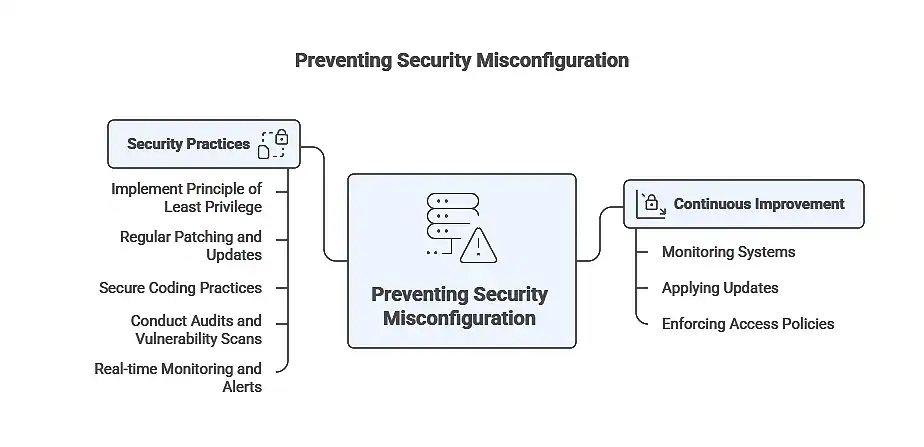
While the risks are significant, the good news is that security misconfiguration can be prevented with proactive measures.
Prevention requires a mindset of continuous improvement: monitoring systems, applying updates, and enforcing strict access policies.
By embedding security into daily operations, businesses can reduce their vulnerability and stop attacks before they escalate.
- Implement principle of least privilege: Grant only necessary permissions to users and systems. This reduces the attack surface and prevents unauthorized access.
- Regular patching and updates: Apply updates promptly to operating systems, applications, and firmware. Automation tools can help you stay current and reduce human error.
- Secure coding practices: Developers should validate inputs, sanitize outputs, and follow secure coding guidelines. Integrating security from the start prevents misconfigurations from entering production.
- Conduct audits and vulnerability scans: Regular audits identify configuration gaps before attackers exploit them. Scans and penetration testing reveal weaknesses in applications and infrastructure.
- Real-time monitoring and alerts: Set up monitoring systems to detect unusual activity immediately. Real-time alerts allow quick action to prevent escalation of security misconfiguration attacks.
Securing Applications, APIs, and Cloud Resources
Modern businesses rely heavily on applications, APIs, and cloud infrastructure to deliver services and store sensitive data. However, these environments are also common targets for attackers exploiting security misconfiguration.
Even small oversights in configuration can create openings that lead to unauthorized access, data leaks, or system manipulation. By implementing structured controls and proactive monitoring, organizations can reduce security misconfiguration vulnerability and strengthen their overall security posture.
- Role-based access control (RBAC): Ensure users can only access the resources required for their job. This minimizes exposure and strengthens security posture.
- Multi-factor authentication (MFA): Adds an extra layer of protection to critical systems. Even if credentials are compromised, attackers cannot gain access easily.
- Automated configuration monitoring: Automated tools continuously check system and application settings. Alerts are generated for anomalies or misconfigurations, ensuring swift correction.
- Ongoing employee training: Teaching staff about security misconfiguration examples helps them recognize and prevent risky behaviors.
Security Misconfiguration Risk and Mitigation Overview
Before closing, it’s useful to see a practical summary of risks and solutions related to security misconfiguration attacks. The table below highlights common vulnerabilities and how to address them.
| Security Misconfiguration | Risk/Impact | Mitigation Strategy |
| Default credentials | Unauthorized access | Change default passwords immediately |
| Unpatched systems | Exploitation of known vulnerabilities | Apply patches promptly, automate updates |
| Open cloud storage | Data exposure | Restrict access, configure proper permissions |
| Excessive access rights | Internal data leaks | Apply least privilege principle |
| Misconfigured web apps | SQL injection, XSS attacks | Secure coding, regular audits |
| Disabled security tools | Disabled security tools | Keep antivirus and monitoring active |
Close Security Misconfigurations Gaps with Reliable IT Support in Houston
Proper configuration is not optional in today’s digital environment. Even small misconfigurations can expose your business to data loss, system compromise, and financial consequences.
A single overlooked setting can create a security misconfiguration vulnerability that attackers exploit, leading to costly downtime and reputational damage. Protecting against these risks requires both proactive monitoring and expert oversight.
Gravity Systems offers dedicated IT teams, on-site support, and continuous monitoring to safeguard your systems. With over 28 years in IT services, our certified professionals specialize in identifying security misconfiguration, preventing attacks, and implementing strategies tailored to SMBs and mid-market organizations.
Contact a trusted IT support provider in Houston today to schedule a consultation and secure your infrastructure against potential security misconfiguration attacks.